


Consumer Experiences
Quoting & Underwriting
CRM & Automation
Services & Growth
One connected operating system for modern life insurance distribution.
See all products →Native GoHighLevel Plugin
Built-in life insurance quoting inside GoHighLevel.
The Quoteplicity Agent Quoter installs into GoHighLevel in one click. Run real-time multi-carrier quotes, pull contact data automatically, and send your client a personalized quote link, all without leaving the CRM you already use.
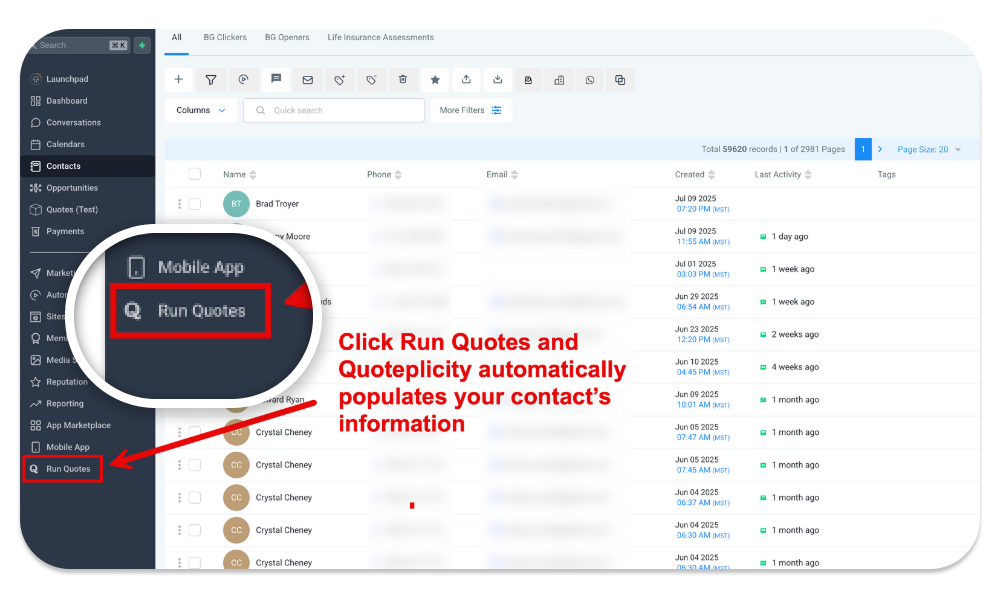
Run life insurance quotes inside your CRM.
The Quoteplicity plugin installs in one click straight from the GoHighLevel Marketplace. Once installed, the quoter launches inside your current GHL window, in your existing navigation. No tab switching, no retyping, no context loss. The quoter is just there as you work the lead.
- Launches directly from your GHL navigation menu
- Auto-feeds the contact's information into the quoter on open
- Lives inside the same window as the rest of your CRM
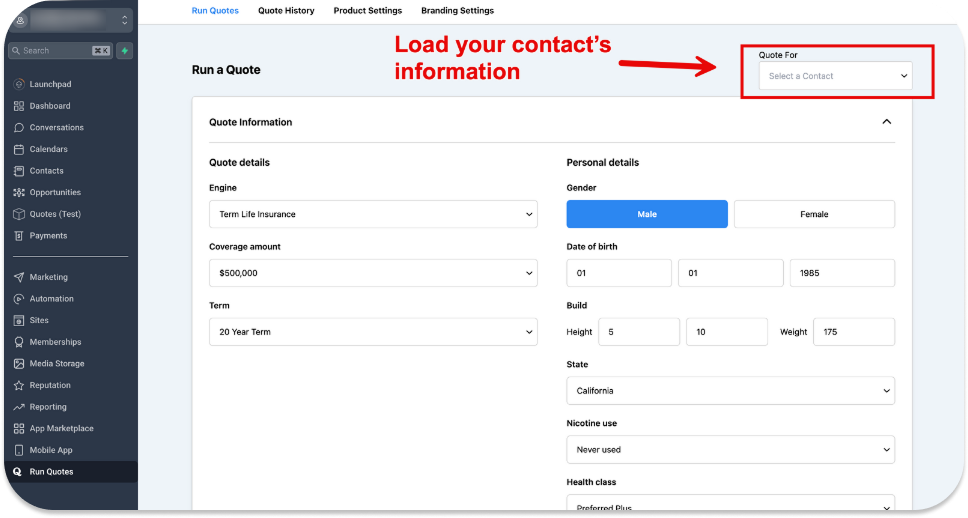
Search and load any contact straight into the quoter.
Look up any contact inside your GoHighLevel account and pull their record straight into the quoter. Name, date of birth, state, and the rest of the demographic context flow in automatically, so you skip the manual typing and start quoting in seconds.
- Search any contact inside your CRM and load them into the quote form
- Auto-fill name, date of birth, state, gender, and tobacco status
- Quotes are stored on the contact record so follow-up is one click
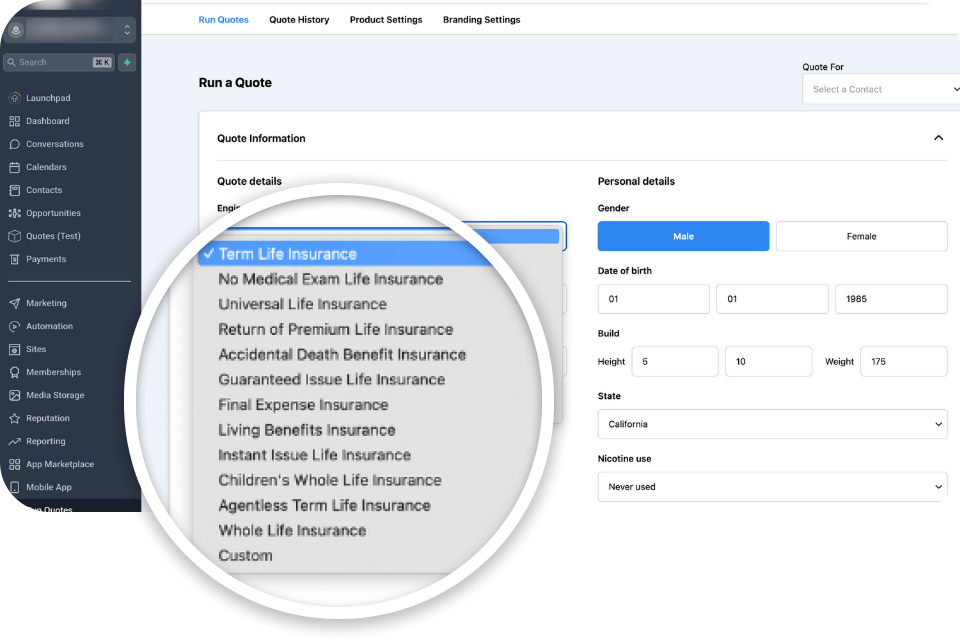
Choose the quote type that fits your client.
Whether you are quoting term, final expense, or something more niche, the plugin gives you the flexibility to run exactly what your client needs. Ten built-in quote engines cover the standard cases, and special engines handle child coverage, return of premium, and accidental death.
- Ten built-in engines including term, no-exam, final expense, and IUL
- Special engines for child coverage, return of premium, and accidental death
- Switch engines without losing the contact context already loaded
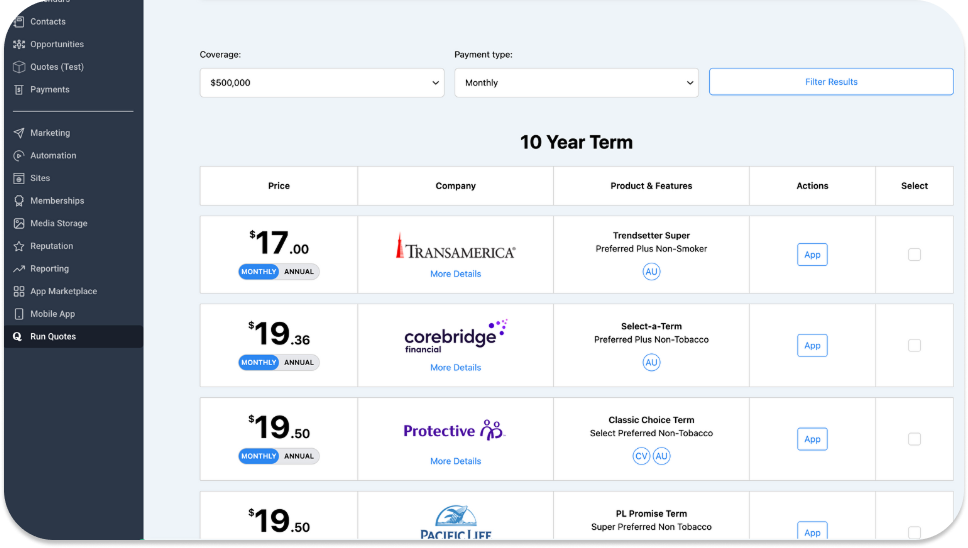
Interactive quote results with full agent control.
When the quote loads. You see a clear, comparable list of carriers and products. Filter by feature, drill into product detail, and choose exactly which quotes go into the package you send the client. Live editing means you adjust face amount, term length, or rider selection without re-running from scratch.
- Live editing of face amount, term length, and rider selection
- Filter by living benefits, return of premium, no-exam eligibility, and more
- Hand-pick which carriers appear in the client-ready quote
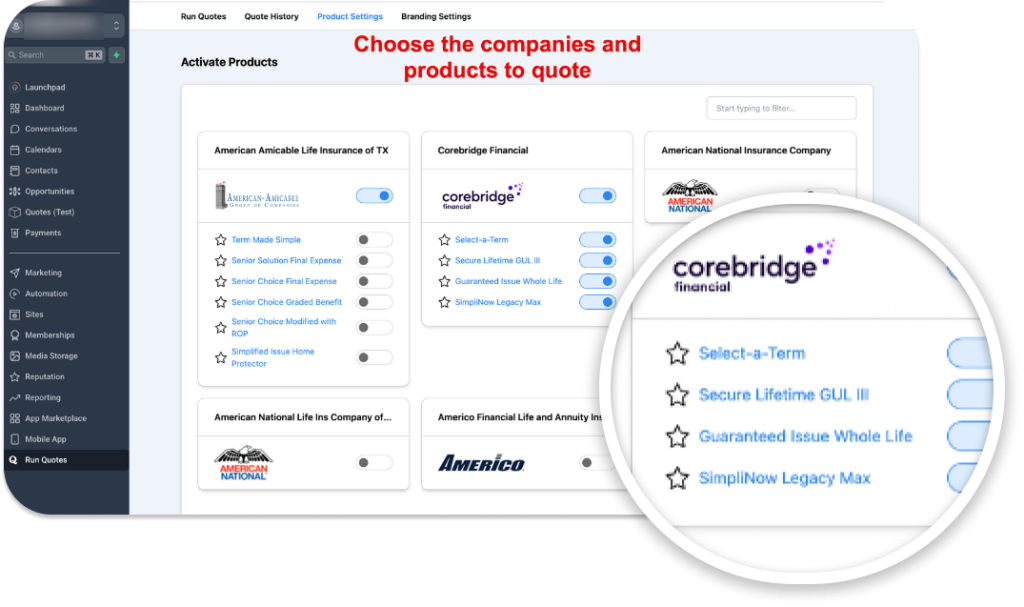
Choose the companies and products that appear.
With 50-plus carriers and hundreds of products available in the system. You decide what shows up. Configure the carriers and product types that align with your appointments and contracts, simplify the decision for your client, and highlight the result you actually want them to take action on.
- Show only the carriers and products you are appointed with
- Highlight a recommended carrier so the conversation stays focused
- Per-engine carrier rules for term, final expense, IUL, and more
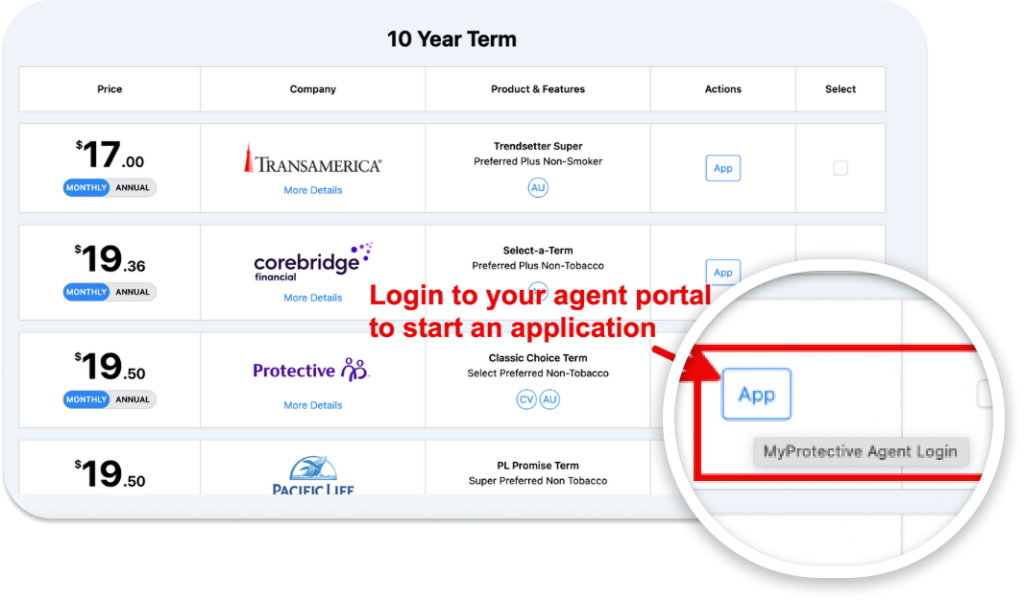
Straight from quote to application.
When it is time to submit an app, click the App button next to the carrier on the result. The plugin takes you straight to the carrier's agent portal or to any custom application URL you have set. No hunting for login pages, no copy-paste between tabs.
- One-click hand-off to carrier agent portals
- Custom application URLs supported per carrier or per product
- Smooth transition from quote to application without context loss
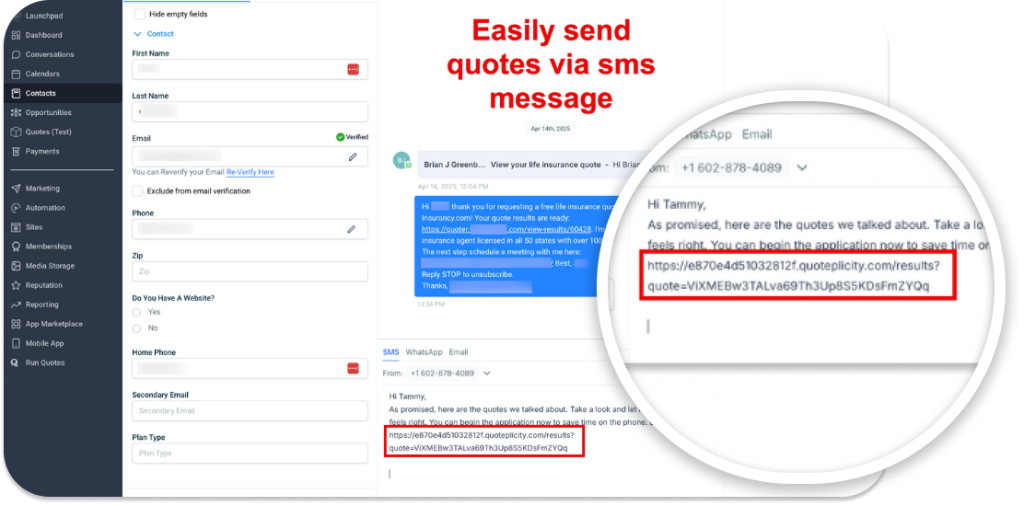
Send smart quote links by SMS or email.
When you save a quote, the plugin generates a personalized link you can send by text or email straight from inside GoHighLevel. The client opens an interactive quote on any device and can start the application directly from the page, no PDF attachments, no static screenshots.
- Personalized quote links sent over SMS or email
- Clients can adjust coverage and term to find the fit that works
- Application-ready buttons turn interest into action without a callback
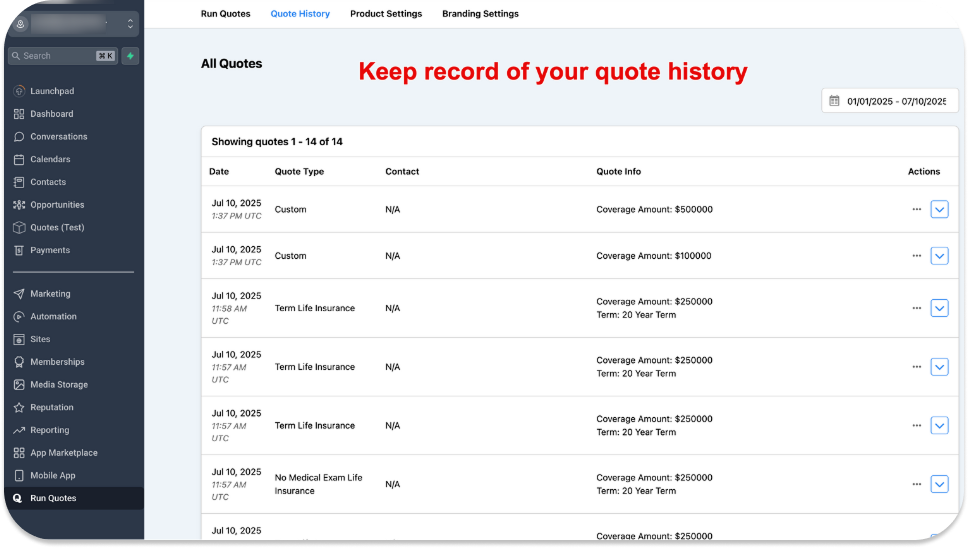
Every quote saved and synced to the contact.
Every quote you run is automatically saved and attached to the matching contact in your CRM. Quote activity is stored as notes on the contact record, so you never lose track of what you sent, when you sent it, or what the client saw.
- Quotes auto-attach to the contact record they were run for
- Quote activity logged as notes on the contact in GHL
- Resend or revise any saved quote in two clicks
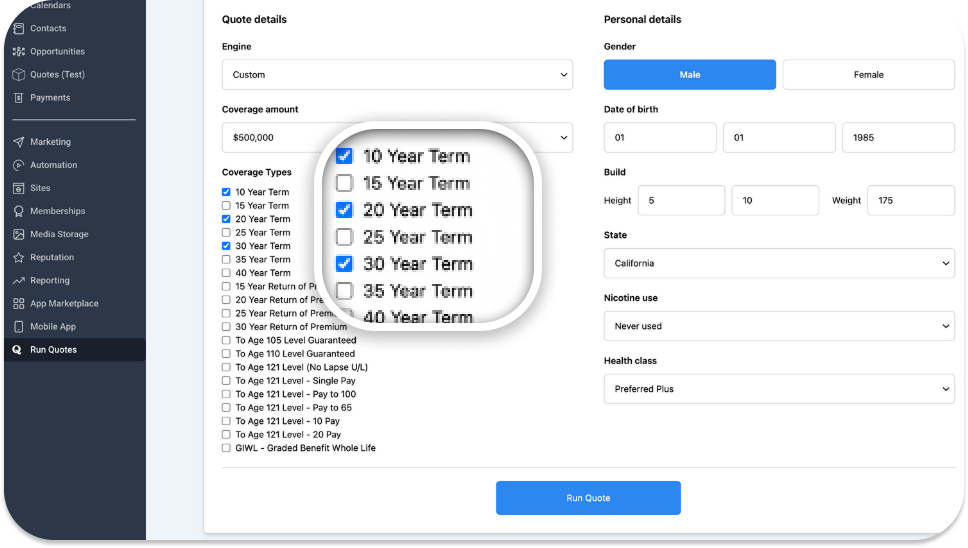
Compare several quote types in one view.
Show the client a side-by-side comparison of 10, 20, and 30-year term, or stack a Universal Life and a Final Expense quote next to each other. The plugin runs multiple engines in a single saved quote and presents the results in clean, comparable tables on one shareable link.
- Run multiple terms and product types inside one quote
- Results render as distinct, side-by-side tables
- One client link covers everything they need to evaluate
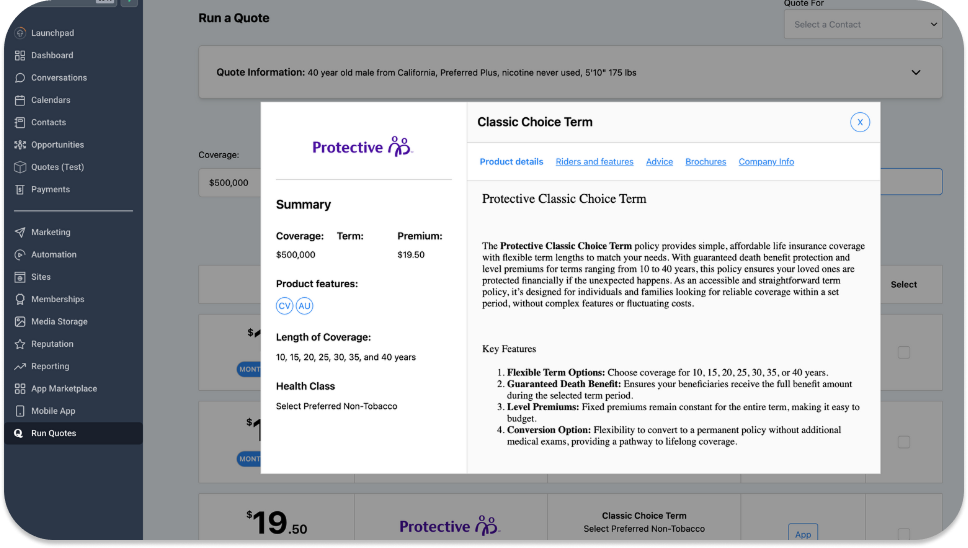
Detailed product information for you and your clients.
Every quote result includes complete product context. Clients see features, riders, and brochures. Agents have sample applications, underwriting guides, and product specs available behind the scenes. Same quote, two levels of detail, no sales script needed to fill the gaps.
- Client-side: features, riders, brochures, and benefits
- Agent-side: underwriting guides, sample applications, product specs
- All organized per carrier and refreshed automatically
Setup
Easy to install. Faster to put to work.
1-click installation
Install directly from the GoHighLevel Marketplace in one click. The plugin adds itself to your CRM navigation and is live immediately. No technical knowledge, no custom configuration, no ticket to support.
Rapid configuration
Choose your carriers, pick your products, and upload your branding. Most agents are running live quotes inside their CRM within 20 minutes of install.
Run your first quote
Pick a contact, pick a quote type, and send the quote link. Every result is saved back to the contact record automatically so the next follow-up takes one click.
Help
Frequently asked questions
See GHL Agent Quoter in action.
Run a real multi-carrier quote in the live demo, or start a free 14-day trial and put GHL Agent Quoter to work in your agency.